...
In any list (Due Out, Arrivals, Search, In House), you can use the choice of columns to form it. To do this, right-click on any heading (Room, Guest Name, etc.). Then the following pop-up window appears:
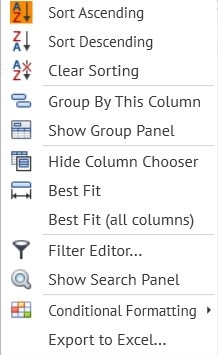
Sort Ascending - сортировать броней гостей по имени в алфавитном порядке с А по Я sort guest reservations by name in alphabetical order from A to Z.
Sort Descending - сортировать броней гостей по имени в алфавитном порядке с Я по А sort guest reservations by name in alphabetical order from Z to A.
Clear Sorting - clear sorting.
Group By This Column - группировка броней по типам в выбранной Вами колонке grouping reservations by types in the column which you selected.
Show Group Panel - вывод на экран панели для выбора колонки- display pop-up window to select a columns.
Best Fit - выравнивание по ширине выбранной колонки Leveling the width of the selected column.
Best Fit (all columns) - выравнивание по ширине всех колонок. Leveling the width of all selected column.
Filter Editor and Show Search Panel - internal search in an already generated list of dataРедактор фильтров и Показать панель поиска - внутренний поиск в уже сформированном списке.
Conditional formatting - условное форматирование (планируемая опция с изменением цветовой гаммы)
Экспорт в Excel - возможность экспортирования сформированного списка в Excel.
Выбор колонок и их значение:
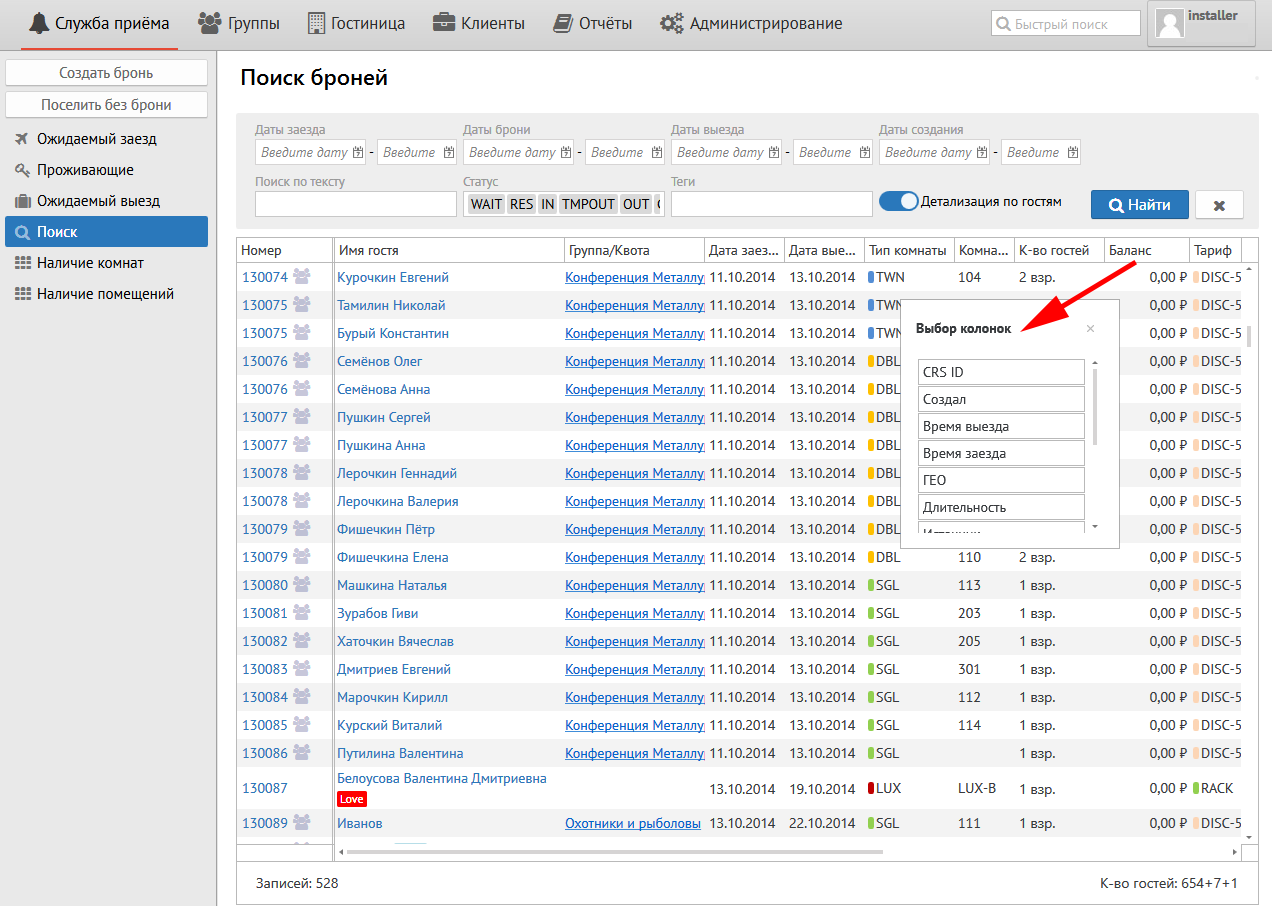
Номер - № брони.
Имя гостя - имя и фамилия гостя.
Группа/Квота - № группы/квоты, если гость принадлежит к таковой.
Дата заезда - дата заезда гостя в Ваш объект.
Дата выезда - дата выезда гостя из Вашего объекта.
Время заезда - время заезда гостя в Ваш объект.
Время выезда - время выезда гостя из Вашего объекта.
Тип комнаты - тип комнаты, в котором будет проживать Ваш гость.
Длительность - количество ночей, которое планирует проживать Ваш гость.
Комната - № комнаты.
К-во гостей - количество гостей в брони.
Баланс - баланс брони.
Тариф - тарифный план брони.
Статус - статус брони.
CRS ID - CRS номер (указывается только для броней, появившихся через интернет).
Комментарий - комментарий из брони.
Дата создания - дата создания брони.
Дата изменения - дата последнего изменения брони.
Гарантия оплаты - гарантия оплаты брони.
grouping reservations by given types.
Export to Excel - export the generated list to Excel.
Pop-up window with columns. The meaning of columns.
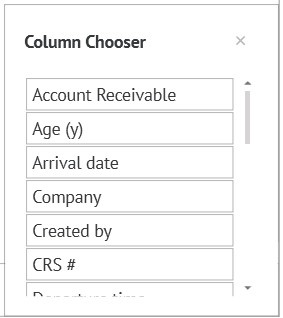
Number "#" - reservation number.
Guest Name — The guest’s first and last name.
Group / Quota - Number of Group / Quota, if the guest belongs to such.
Arrival date - date of arrival of the guest at your property.
Departure date - the date the guest leaves your property.
Fact arrival time - time of the guest's arrival at your property.
Fact departure time - time of the guest’s departure from your property.
Room Type - The type of room your guest will be staying in.
Duration - the number of nights your guest plans to stay.
Room - room number.
Number of guests - number of guests in the reservation.
Balance - the balance of the reservation.
Rate - reservation plan.
Status - the status of the reservation.
CRS # - CRS number (indicated only for reservations that reserve online).
Notes - a comment from the reservation.
Created date - the date the reservation was created.
Modified date - the date of the last change of the reservation.
Guarantee - type of guarantee of the reservation
Geo - Geo code of the reservationГЕО - ГЕО код брони.
Источник - источник бронирования, заполненный в брони.
...