...
Export to Excel - export the generated list to Excel.
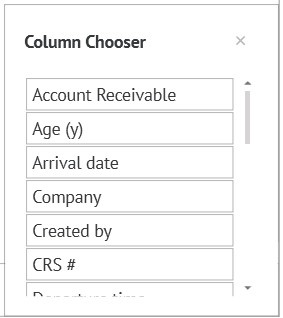
Pop-up window with columns. The meaning of columns.:
Number "#" - reservation number.
...
Guarantee - type of guarantee of the reservation
Geo - Geo code of the reservation.
Source - booking source filled in the reservation.
Company - a company filled in the reservation.
Account receivable - the company which pay for reservation.
Share # - common number of shared reservation.
Open code - an open code filled in the reservation.
Источник - источник бронирования, заполненный в брони.
Компания - компания, заполненная в брони.
Компания-плательщик - компания-плательщик, заполненная в брони.
Общий ID разд. брони - № разделённой брони.
Открытый код - открытый код, заполненный в брони.
Сегмент рынка - сегмент рынка, заполненный в брони.
Трек - трек-код, заполненный в брони.
Market segment - A market segment filled in the reservation.
Track - a track code filled in the reservation.
Title - title of the guest.
Location - location of the room in your property.
Tax schema - tax schema in the reservation.
Phone - phone number of the guest.
Discount - discount amount.
Discount code - discount code from the section in administration.
Created by - user who created the reservation.
Deposit due - date by which a deposit is due before.
Deposit amount - deposit amount.
Age (years) - guest age.
Room category - room type categories.
Payed - Amount of already paid services.
Note: to carry desired column to the generated list, you need to click on the column with the left mouse button and transfer it to the listПримечание: Для того, чтобы перетащить нужную колонку в любой сформированный список, необходимо нажать на колонку левой мышкой и перетащишь её наверх, в список.