|
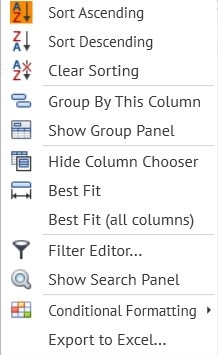
In any list (Due Out, Arrivals, Search, In House), you can use the choice of columns to form it. To do this, right-click on any heading (Room, Guest Name, etc.). Then the following pop-up window appears:
Sort Ascending - sort guest reservations by name in alphabetical order from A to Z.
Sort Descending - sort guest reservations by name in alphabetical order from Z to A.
Clear Sorting - clear sorting.
Group By This Column - grouping reservations by types in the column which you selected.
Show Group Panel - display pop-up window to select a columns.
Best Fit - Leveling the width of the selected column.
Best Fit (all columns) - Leveling the width of all selected column.
Filter Editor and Show Search Panel - internal search in an already generated list of data.
Conditional formatting - grouping reservations by given types.
Export to Excel - export the generated list to Excel.
Pop-up window with columns. The meaning of columns.
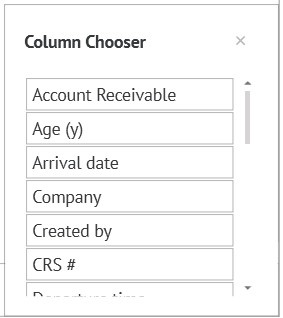
Number "#" - reservation number.
Guest Name — The guest’s first and last name.
Group / Quota - Number of Group / Quota, if the guest belongs to such.
Arrival date - date of arrival of the guest at your property.
Departure date - the date the guest leaves your property.
Fact arrival time - time of the guest's arrival at your property.
Fact departure time - time of the guest’s departure from your property.
Room Type - The type of room your guest will be staying in.
Duration - the number of nights your guest plans to stay.
Room - room number.
Number of guests - number of guests in the reservation.
Balance - the balance of the reservation.
Rate - reservation plan.
Status - the status of the reservation.
CRS # - CRS number (indicated only for reservations that reserve online).
Notes - a comment from the reservation.
Created date - the date the reservation was created.
Modified date - the date of the last change of the reservation.
Guarantee - type of guarantee of the reservation
Geo - Geo code of the reservation.
Source - booking source filled in the reservation.
Company - a company filled in the reservation.
Account receivable - account receivable company filled in the reservation.
Общий ID разд. брони - № разделённой брони.
Открытый код - открытый код, заполненный в брони.
Сегмент рынка - сегмент рынка, заполненный в брони.
Трек - трек-код, заполненный в брони.
Примечание: Для того, чтобы перетащить нужную колонку в любой сформированный список, необходимо нажать на колонку левой мышкой и перетащишь её наверх, в список.