...
- Go to "External rates" tab.
- Select a rate plan from list.
- If rate contains some services packages, link the required package (You can find below how to link several packages at the same time).
- Specify the external rate code (API code) from TL (rate codes can be viewed in your personal account or on the Comment tab)
- Click "Add new"
- Go to the "Contracts" tab
- In the "Rates for sale" pop-up menu activate required rates.
| Info |
|---|
Each rate can be added in a separated lines. One rate in LOGUS can be compared with different rates codes from TL. For example, if TL rates from personal account set up as lined and prices do not downloading from LOGUS. |
...
In case when reservation comes with external code 200035, tariff with "NON-REF" reservation and 2 packages will be created.
| Warning |
|---|
Внимание! Одна из ошибок, по причине которой брони с настроенными тарифами не попадают в Logus - тариф не выставлен на продажу.
|
Настройка типов комнат
- Перейдите во вкладку "Типы комнат"
Выберите тип комнаты
Укажите внешний ID (коды можно посмотреть в личном кабинете или на вкладке Описание)
Настройка услуг
В личном кабинете ТЛ настройте два варианта каждой услуги: включенный в стоимость и добавочный.
...
Укажите вариант
Укажите внешний код добавочной услуги из ТЛ (коды можно посмотреть в личном кабинете или на вкладке Описание)
| Info |
|---|
|
Attention! One of the reason why reservations with set up rates don’t displayed in Logus – rate is not available for reservation
|
Room type setting
- Go to "Room types" tab.
- Select the room type.
- Specify the external code / API (codes can be viewed in your TL account or on the Comment tab).
Services setting
- Go to "External services" tab.
- Select an additional service.
- Specify an "Variants".
- Specify the external code / API of the additional service from the TL (the codes can be viewed in your account or on the Comment tab)
| Info |
|---|
|
- 1.
- 2. Add sales channels as shown in first screenshot.
- 3. If the agent code is missing from the link below, then contact TL.
Contracts setting
| Warning |
|---|
Attention! Each Client with the "Agent" role must have a default commission set. |
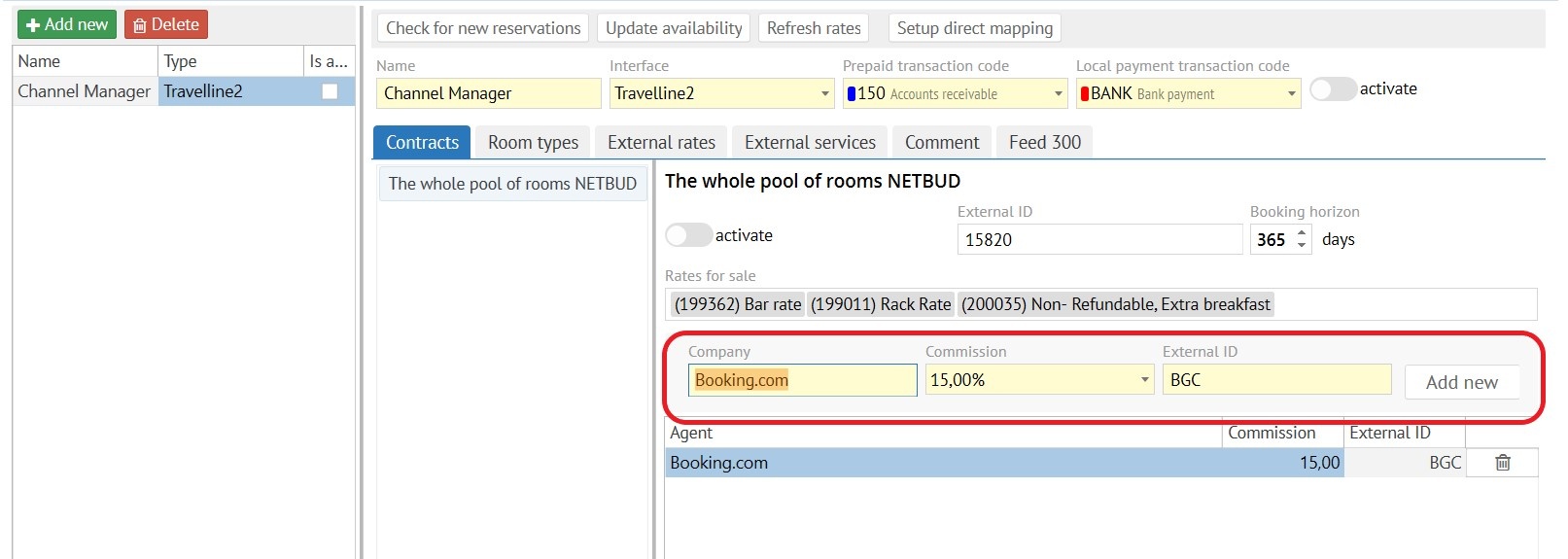
- Go to "Contracts" tab.
- Add sales channels as shown on screenshot below.
- Add TL code of external channel. If the agent code is missing from the link below, then contact TL.
| Info |
|---|
Page with all codes of sales channels |
Настройка каналов
| Warning |
|---|
Внимание! У каждого Клиента с ролью "Агент" должна быть задана комиссия по умолчанию. |
...
| Info |
|---|
Страница со всеми кодами каналов продаж - https://docs.travelline.ru/pages/viewpage.action?pageId=14549221 AVI Отели Онлайн (avia-centr.ru) OTT OneTwoTrip DNT Дельфин LSP Ласпи DTW некий DOTW S7A S7 Airlines (travel retail) AXT Axis.travel AZN Azent BEL BelAgroTravel BKN Bakuun DBV Dobovo.com DNT Delfin-tour.ru EVG Едем в гости HCO RoomGuru/Revato KZK Kuzuk.ru PEG Pegi Pegi TVC Travco *** ВАЖНО!!! Каналы, отмеченные звездочкой, могут работать с отелем по схеме FREE SALE и в таком случае будут игнорировать данные по наличию комнат выгружаемые из Логус в ТЛ. |
Обновление тарифов и доступности номеров:
...